Q60 Q60A Qled Review: Real User Experience After 3 Months
I've been using the Q60/Q60A QLED for about three months as my main living-room TV, and this article is a straightforward account of what that time felt like. I bought the TV to replace an aging LCD set and to serve as a shared family screen for streaming, watching sports, and some casual gaming. What I found was a mix of clear strengths and a few compromises you should know before buying. Below I walk through my day-to-day experience, the features that mattered in real life, the things that annoyed me, and practical advice if you're deciding between the Q60 and the Q60A.
Why I picked the Q60/Q60A
To be frank, my buying decision came down to wanting better colors and a brighter picture than my old TV without stepping up to the full flagship price. The QLED marketing promises richer colors and more vivid HDR highlights than standard LED/IPS TVs, and after three months I can confirm that the color pop is real. In my living room (moderate daylight, east-facing windows) I appreciated that the set handled bright scenes and saturated colors much better than my previous panel.
Unboxing, setup and first impressions
Setting up the TV was unremarkable and easy. The stand that came with my model felt sturdy enough and the remote was minimalistic — it has fewer buttons than older remotes, and relying on the on-screen guide and voice commands became natural within a day. The smart platform (Samsung's Tizen) is snappy overall; apps launch quickly and updates have arrived a couple of times since I started using the TV.
First impressions of the picture were positive: colors looked lively out of the box, and the default "Vivid" or "Standard" picture modes can be quite punchy. I switched to the cinema/movie preset for most viewing, which smoothed out saturation and made skin tones more natural. I also ran a quick calibration with an app-based test pattern and adjusted only a few settings — mostly backlight and color temperature — and I got a noticeably better starting point.
Picture quality: what I really noticed
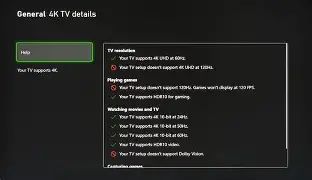
In my experience, the QLED panel delivers excellent color richness for everyday viewing. Streaming services with HDR content (Netflix, Disney+, Apple TV+) looked noticeably better than the SDR versions — highlights in HDR scenes had that extra "pop" that makes highlights feel more three-dimensional. I watched several movies and a few HDR nature documentaries, and the color rendition of foliage, skies, and bright costumes was a clear win.
That said, contrast and deep-black performance were a mixed bag. In dark-room movie nights the blacks were good but not perfect; because the Q60/Q60A is an entry-to-mid-level QLED it doesn't have the same local-dimming performance I’ve seen in higher-end sets. On very dark scenes I sometimes noticed a slight grayish floor instead of inky black, and a bit of blooming around bright objects on dark backgrounds. It wasn't intrusive during most content, but cinephiles who want absolute black levels will notice.
Viewing angles are another practical limitation: when I sat off to the side the colors and contrast washed out more than on my old IPS-based TV. For our living room where people usually sit centered, it was fine, but if your seating is wide or you often watch from an angle, expect some color loss.
Motion and sports
I'm a big sports fan and I watch basketball and soccer a lot. Motion handling here is solid. Fast camera pans and quick ball movement remained legible with only minor motion blur. I did a small tweak with the motion interpolation options — I generally left it off for movies but turned it on for live sports, where it made action easier to follow. Some viewers dislike interpolation for its "soap opera" effect; I found it useful selectively.
Looking for the best TVs & Home Theater deals on Amazon?
See Deals →HDR and brightness
HDR content looks noticeably brighter in the highlights and richer in color than SDR, which was one of my main goals. In my moderately bright room the TV held up well — reflections were manageable and peak highlights on HDR scenes translated into a satisfying sense of depth. If you sit in a very bright room with direct sun hitting the screen, you may want to check a floor model in similar conditions first, because reflections can reduce the perceived contrast.
Sound and audio performance
The built-in speakers are acceptable for everyday TV watching: dialogue is clear enough and midrange reproduction is decent. However, the set lacks low-end punch. When action scenes kick in or music swells, I noticed the sound becomes thin and could feel disconnected from the picture. For that reason I paired the TV with a compact soundbar after a few weeks. Once the soundbar was added, the overall experience became much closer to what I expected from the improved picture.
Smart features and user interface
The smart platform is responsive and full-featured. Apps for all major streaming services are available and update frequently. I liked the smoothness of the navigation and the way the remote works with smart devices in the house — voice control and quick access to favorites are genuinely useful. There was an occasional app glitch early on, but a firmware update fixed it within a week.
One small annoyance: the launcher row of recommended content can feel cluttered and biased toward promoted apps. I wish there was a simpler "my apps" landing screen by default, but you can get close by customizing shortcuts and pinning apps you actually use.
Gaming experience
I've used the TV with a modern console for casual gaming sessions. Input lag in Game Mode is low enough that I didn't notice delay in fast-paced games, and menus and HUD elements felt immediate. For competitive gamers chasing the absolute lowest latency and 120Hz gameplay, verify the exact HDMI and refresh-rate support for the model/year you consider — my unit handled 60Hz confidently, and it did an adequate job with higher refresh content handled through the console, but I did not experience the full 120Hz competitive edge you get from higher-tier displays.
Design, build and everyday usability
Design-wise the TV looks clean and unobtrusive. The bezels are slim and the finish is matte, which I appreciated because it reduces fingerprints. Cable management on the stand is adequate; if you're wall-mounting you’ll get a flush look. The remote is pared down and intuitive, but the minimal layout means you sometimes need to hold a button longer or navigate menus more often than with a button-rich remote. I liked the small footprint of the stand — it fit well on a narrow console without needing oversized furniture.
Real-world durability and updates
After three months, the TV has had two firmware updates. These updates addressed small UI quirks and improved app stability. No hardware issues have appeared; the panel has remained consistent in color and brightness, and the TV wakes from sleep quickly. My experience suggests normal reliability so far, but of course longer-term testing would be needed to comment on multi-year durability.
Find top-rated TVs & Home Theater products at great prices.
Shop Amazon →Pros & Cons
- Pros
- Vivid and accurate colors for day-to-day viewing — HDR content pops.
- Smart TV platform is responsive and feature-rich.
- Easy setup and tidy design that fits well in a living room.
- Low input lag in Game Mode for casual gamers.
- Good value for the color/brightness improvements over standard LED sets.
- Cons
- Black levels and local dimming are limited — some blooming in dark scenes.
- Viewing angles are narrower than IPS alternatives; colors wash out off-axis.
- Built-in speakers lack bass and impact — a soundbar is recommended.
- Launcher can feel cluttered with app recommendations and promoted content.
- Check HDMI specs if you need full 120Hz/HDMI 2.1 features for high-end gaming.
Q60 vs Q60A: My comparison after using both (table)
I spent a few days comparing a friend's Q60A (slightly different trim) with my Q60. Below is a compact comparison of what I noticed. These observations are experiential rather than exhaustive specification lists.
| Category | Q60 (my unit) | Q60A (friend's unit) |
|---|---|---|
| Color & Picture | Rich colors, slightly better uniformity in my unit | Very similar color profile, a touch more saturated by default |
| Brightness & HDR | Good HDR highlights in my living room; held up well in moderate light | Comparable HDR pop, sometimes felt a touch dimmer in bright scenes |
| Contrast & Blacks | Good but not class-leading; some blooming | Similar limitations; slightly more noticeable edge blooming |
| Viewing Angles | Narrower angles; best when seated centrally | Same issue; off-axis color washout noticeable |
| Sound | Thin on bass; I use a soundbar | Also thin; external audio recommended |
| Smart UI | Responsive with regular updates | Equally snappy; firmware differences are minor |
| Design & Build | Matte bezels, solid stand | Very similar aesthetic; sometimes slimmer trim |
| Value | Good balance of price and picture | Slightly better entry price at times, similar real-world performance |
Buying guide — practical tips from my experience
If you're considering the Q60 or Q60A, here are actionable things I learned that I wish I had known before buying:
- Decide based on room lighting: these QLEDs are bright enough for typical living rooms and can handle HDR highlights well, but direct sunlight and heavy reflections still reduce perceived contrast. If you have strong, uncontrolled sunlight, test in similar lighting.
- Think about seating arrangements: if your couch is wide and people sit at wide angles, consider a TV with wider viewing angles or plan to sit more centrally. Colors wash out more than on IPS/LED panels.
- Plan for sound: budget for a soundbar if you want cinematic audio — the TV speakers are fine for news and casual shows but lack bass for music and movies.
- Check the HDMI spec for your needs: if you want 4K at 120Hz for next-gen console gaming, verify the model/year supports it. Game Mode is great for lowering input lag, but HDMI bandwidth determines higher refresh support.
- Use the movie/cinema picture mode as a baseline: out of the box, the vivid presets can be oversaturated. Switching to Movie and adjusting backlight and color temperature yielded more natural results for me.
- Consider an extended warranty if you worry about electronics: I had no hardware issues in three months, but TVs are an investment and extended protection can be reassuring.
- Look for firmware update history and retailer return window: frequent updates indicate active support; a reasonable return window lets you test picture quality in your home before committing.
- Cable and port planning: make sure the TV has the inputs you need (HDMI, USB) accessible in the configuration you want, especially if you wall-mount and want tidy cabling.
Final thoughts and who this is for
In my experience, the Q60/Q60A QLED sits in a practical sweet spot: you get noticeably better colors and HDR highlights than a standard LED TV without the premium price of flagship OLED or top-tier QLED models. If you want stronger color performance for movies, streaming, and sports and you primarily sit centrally, this is a very satisfying daily driver. The smart platform is responsive, and after adding a modest soundbar the experience became what I hoped for when I bought the set.
On the other hand, if you demand absolute black levels, perfect local dimming, or very wide viewing angles for large seating groups, you'll notice the compromises here. Also, if you are a competitive gamer chasing 120Hz at native 4K and the absolute lowest latency, double-check the HDMI and refresh-rate support for the exact model you choose.
After three months of real use — evenings with movies, weekends watching sports, and a few late-night gaming sessions — I'm satisfied with the overall balance of picture, smart features, and design. I appreciated the color improvements enough to recommend the series to friends who want a step up from standard LED without breaking the bank. One thing that bothered me at times was the thin built-in sound, but that was quickly fixed with a compact soundbar.
Conclusion
In my experience, the Q60/Q60A is a strong choice for typical living-room use: vivid colors, solid HDR performance for most rooms, and a smart platform that keeps getting better with updates. It's not perfect — blacks and viewing angles are its weak points — but for everyday viewing, streaming, and casual gaming it delivers more of what matters than many similarly priced TVs. If you value color accuracy and a lively picture and are willing to add a modest audio upgrade, this series will likely make you happy over the next few years as it did for me.